Personalization Dashboard & Account Profile
The system that turns a generic SAP.com login into a role- and interest-based home base — and the data layer behind it, which went on to personalize the site well beyond the dashboard, from the homepage hero to promotional content encountered while browsing.
The problem
SAP.com serves people who each want something completely different from it — a buyer researching S/4HANA Cloud, a partner managing a storefront, an existing customer checking on a support case.
A one-size-fits-all account experience couldn't serve all of them well. Someone who'd told SAP they cared about a specific product shouldn't have to dig through generic navigation to find relevant content, and the sheer footprint of SAP's portfolio — dozens of products, thousands of pieces of content, multiple languages and regions — meant a static page would go stale immediately. The system needed to reorganize itself around each person, automatically, and stay useful as their interests and activity changed.
The system
Internally, this system is known as the Marketing Information Center (MIC). I designed and architected the logic, design, and flow for the full path: the account menu that's the entry point on every SAP.com page, the interest-gating step that captures what a user cares about, the personalized dashboard built from that input, and downstream content pages that stay filtered to it. An IA/UX team later documented this work as a formal information architecture spec, mocking up my design deliverables directly.
1. Account menu
The persistent entry point in global navigation — account management, product log-ins, and self-service actions, organized by what a user is likely to need next.
2. Interest gating
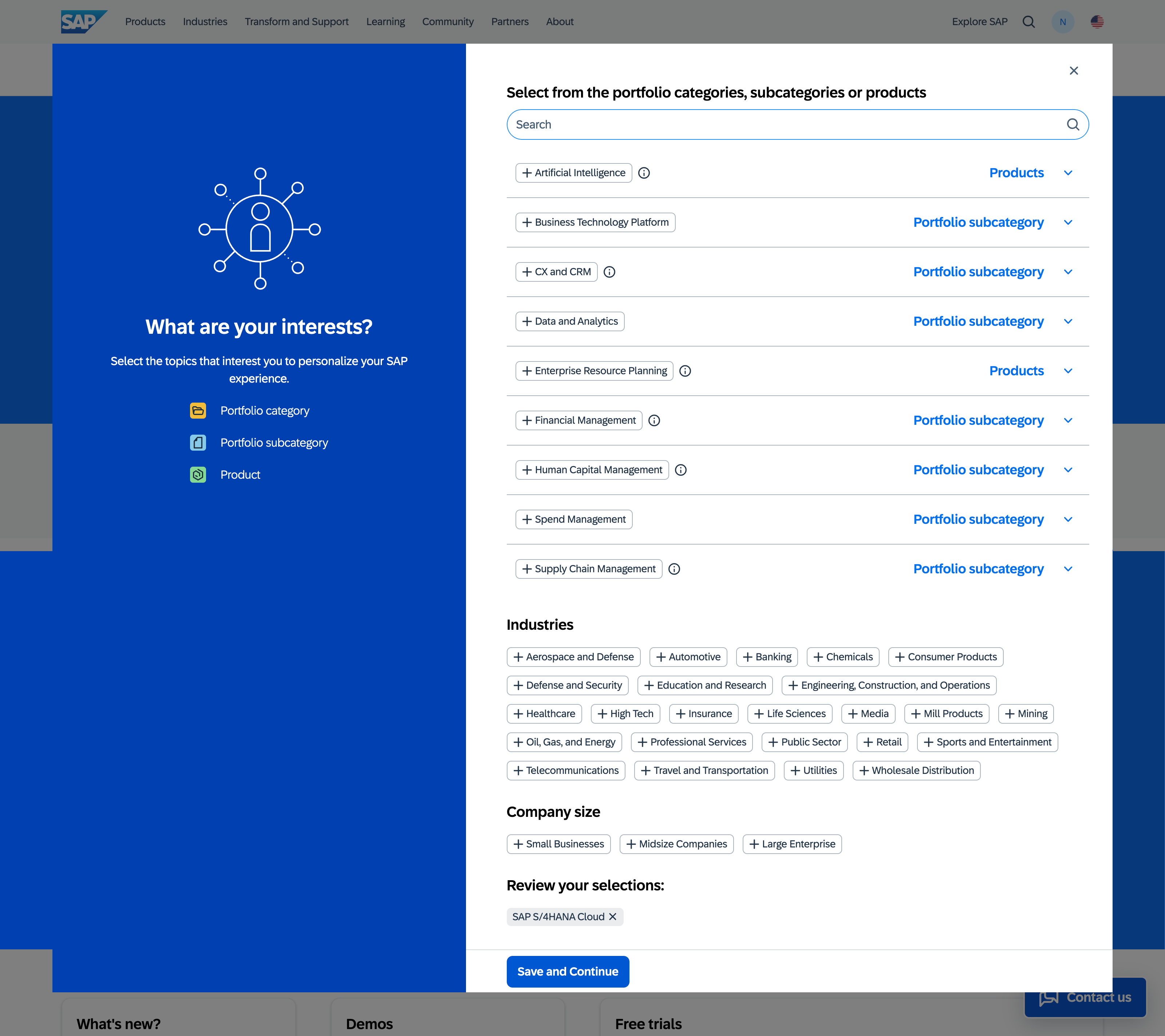
A lightweight "Select your interests" step that captures product and topic preferences, which then drives everything the dashboard surfaces.
3. Personalized dashboard
A modular home base — demos, trials, learnings, events, saved items, recommendations — each tile reflecting that individual's real activity and selections.
4. Adaptive content pages
Downstream pages like "What's New" inherit the same interest filters, so personalization doesn't stop at the dashboard — it follows the user into the content itself.
Account menu: the entry point
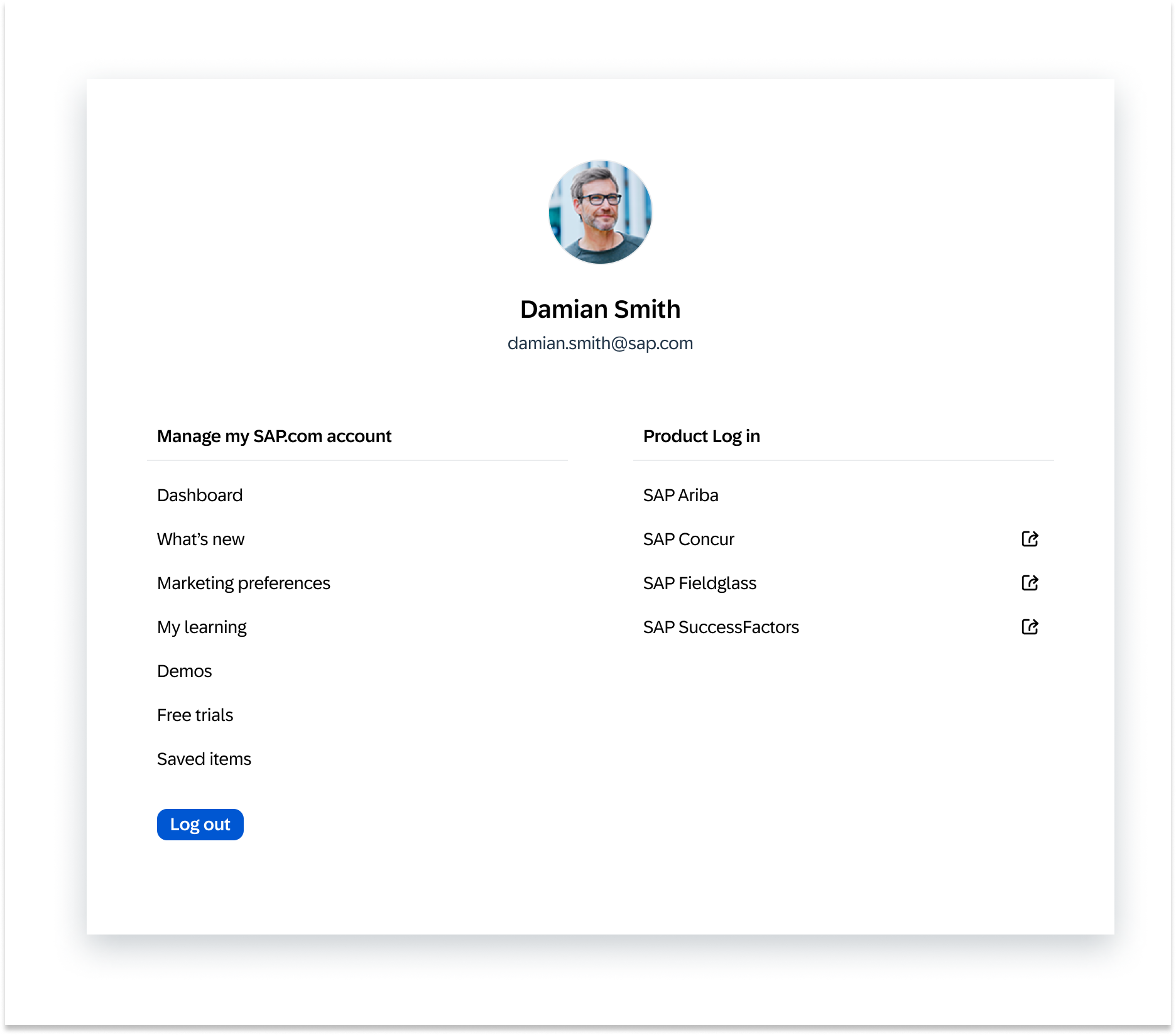
Every path into this system starts here. I designed and architected its structure and logic from the ground up — what belonged under account management versus product log-in, when a category needed its own column, and how deep a first-level menu should go before it needed to expand further.
The two options below came out of that work directly: store.sap.com was being retired as its own separate SAP property, with its self-service functionality migrating into the global site. I designed both directions and put them in front of stakeholders and developers for feasibility review before a direction was chosen.
Option 1 — chosen
Option 2
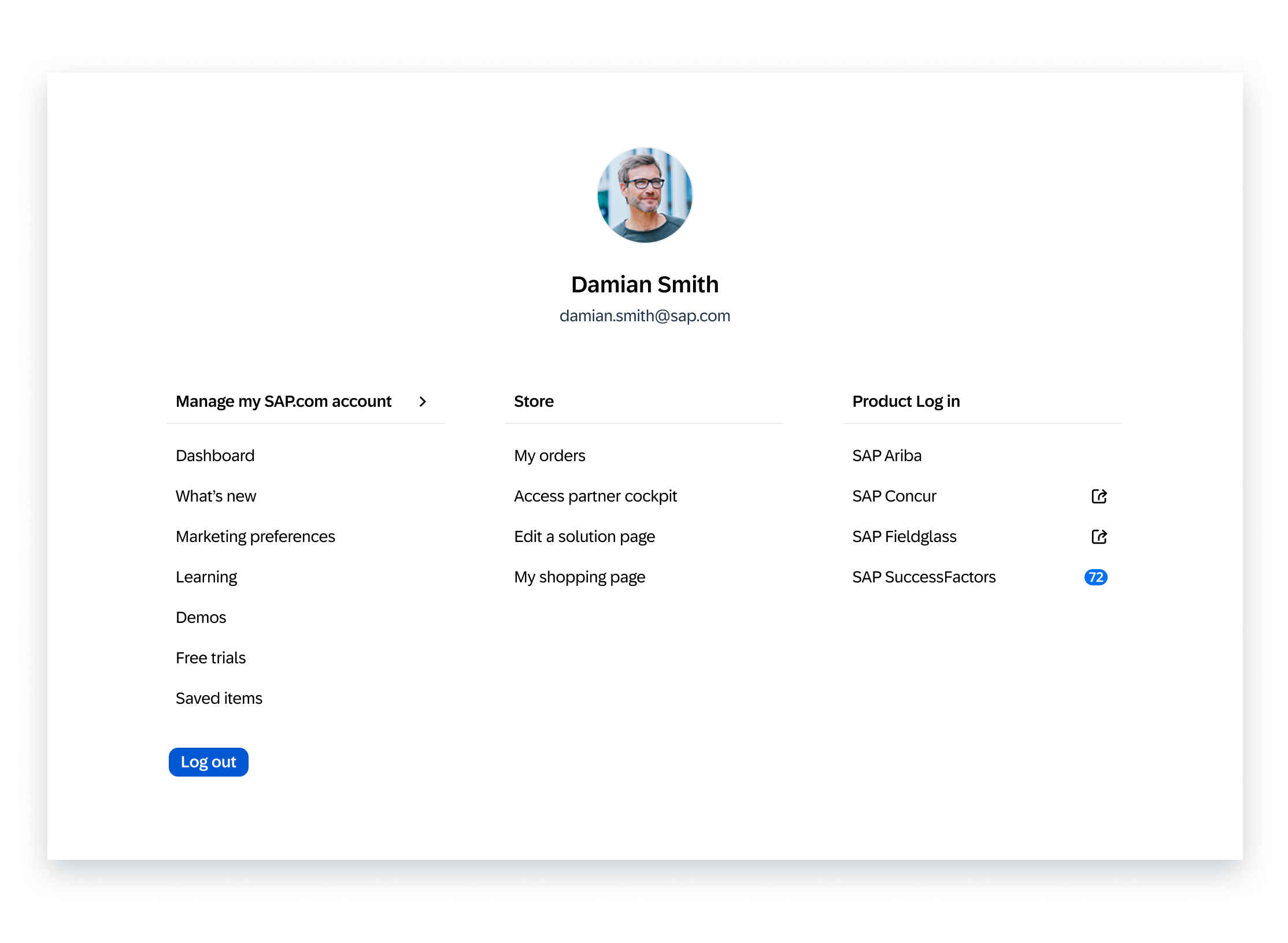
Option 2 was the more ambitious direction — folding store.sap.com's self-service actions (orders, the partner cockpit, editing a solution page, the shopping page) into their own Store column inside the global account menu itself, plus a live notification badge on SAP SuccessFactors and a chevron on Manage my SAP.com account for a deeper second level. Option 1 was the one chosen: migrating the full purchasing, buying, and checkout experience into the global site was a larger development effort than the timeline supported, so the leaner menu shipped first, without folding Store actions in directly.
Note: "Damian Smith" is a demo persona used for internal screenshots, not a real SAP customer.
The dashboard: built around what you've told it
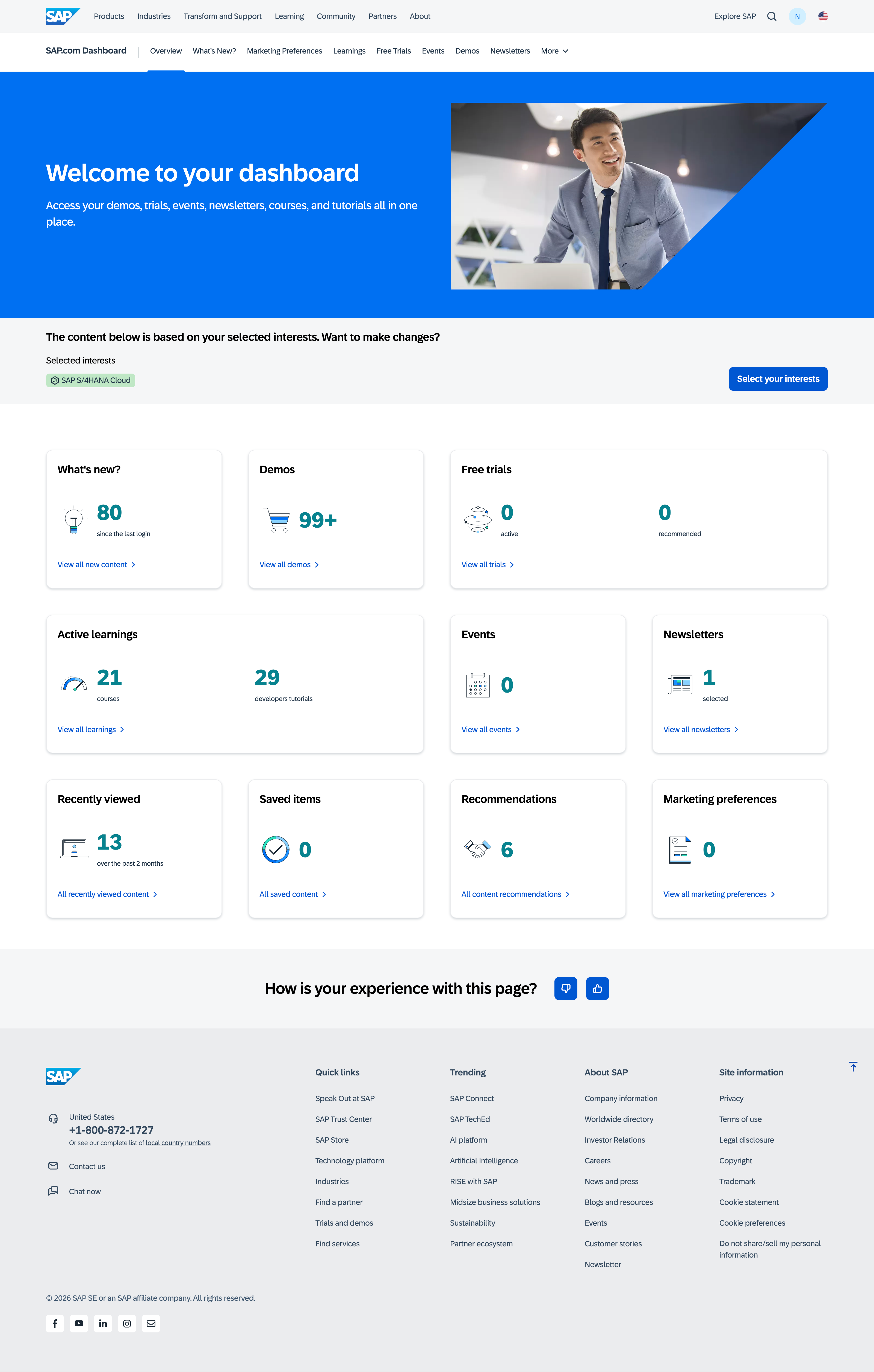
Once a user selects interests — a product like SAP S/4HANA Cloud, for instance — the dashboard reorganizes itself around that choice. Every number on the page is real and personal to that account: new content since last login, active trials, saved items, learning progress, upcoming events.
What's new
New content since last login, filtered to selected interests
Demos & free trials
Active and recommended, tied to product interest
Active learnings
In-progress courses and developer tutorials
Events & newsletters
Selected and upcoming, per account
Recently viewed & saved
A running history the user can return to
Recommendations
Suggested content based on activity and interests
Personalization follows the user downstream
The dashboard isn't a one-off — the same interest filters carry into full content pages. "What's New" is the clearest example: a filterable, taggable feed of thousands of pieces of content (customer stories, product information, events) that opens already scoped to what the account cares about, with content-type filters and faceted search layered on top for anyone who wants to go broader.
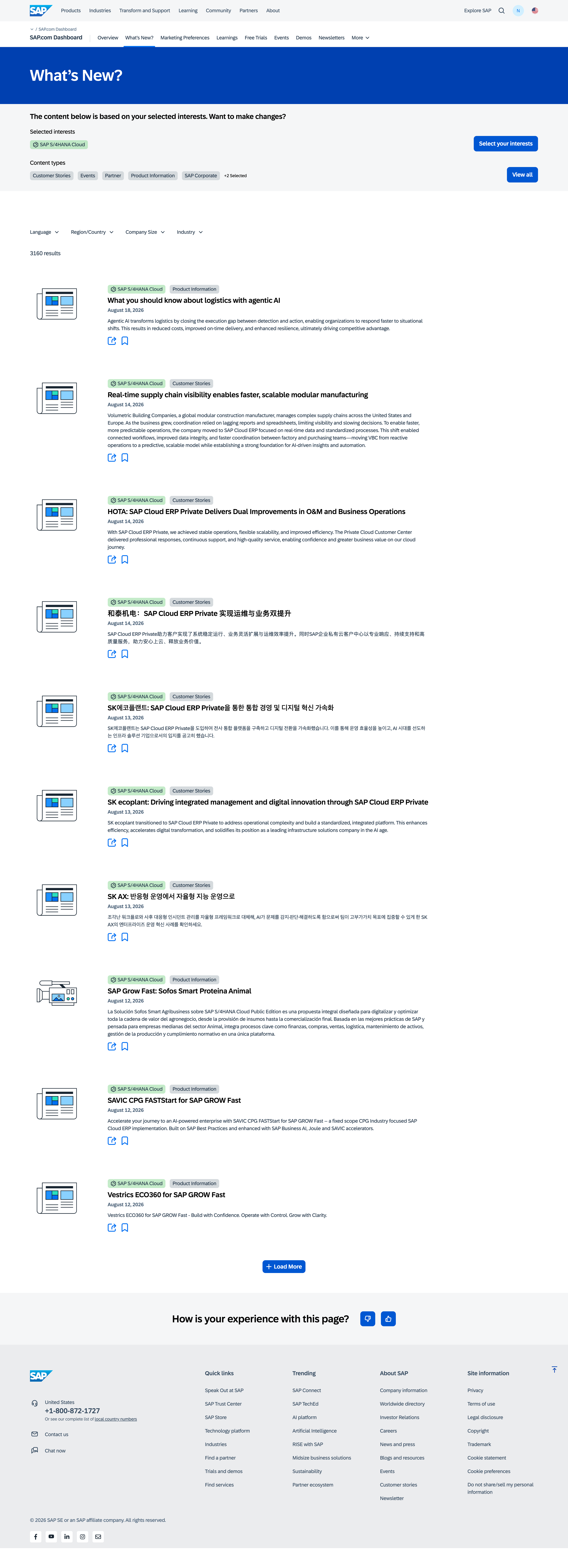
This is also where the scale of the system shows up: the same feed structure serves localized content across languages and regions, so the personalization logic had to hold up globally, not just for English-language, U.S.-based accounts.
The bigger picture: a data layer for the whole site
The real goal was never just a nicer account dashboard — it was building the data layer that let SAP personalize the entire site around what a person had told it they cared about.
The interests captured at gating became reusable signal well beyond the profile section: the homepage hero, promotional content surfaced as a user browses the site, and other adaptive pages could all draw on the same interest data rather than each building their own collection mechanism. Getting the account dashboard right was what proved the model and made that broader, site-wide personalization possible.
Approach
Systems thinking
Designed one underlying logic — interest selection driving both a dashboard and downstream content — rather than one-off personalized modules that would need to be maintained separately.
Built to scale
Accounted for SAP's full footprint from the start: a portfolio of products (Ariba, Concur, Fieldglass, SuccessFactors, and more), thousands of content items, and a global, multilingual audience.
What Natalie should add to finish this case study
- More precise timeline — 2024 is set; add a month or quarter if useful, and note when the dashboard and interest-gating step originally shipped versus when the store.sap.com migration options were designed.
- Any numbers behind the site-wide personalization outcome — adoption of the interest-selection step, or engagement lift on personalized hero/promotional content, if available.
- Your IA/UX spec file references an unshipped "Post-MVP" gamified dashboard concept — left out for now since it's forward-looking product direction rather than shipped work. Say the word if you want a short, careful mention added.